
ZombieBooth App
Imagine scrolling through your phone on a lazy afternoon, snapping a quick selfie, and then watching in horror (and delight) as your face morphs into a rotting, groaning zombie right before your eyes. That’s the kind of fun the ZombieBooth app has been delivering for years, and even in 2026.
It’s still a go-to for anyone looking to add a spooky twist to their photos. Whether you’re prepping for Halloween, pulling off a prank on friends, or just killing time with some creative editing, the ZombieBooth app turns ordinary pictures into undead masterpieces with its clever 3D animations and easy-to-use tools.
First launched back in the early 2010s by MotionPortrait, Inc., this app has stood the test of time. As of early 2026, it’s racked up impressive stats: the original ZombieBooth and its sequel have combined for over 25 million downloads worldwide, with the latest version 4.52 rolling out minor bug fixes and improvements as recently as April 2025.
It’s not just about numbers, though—users love how it brings Hollywood-level zombie effects to your fingertips without needing fancy equipment or skills. In this review, we’ll dive deep into what makes the ZombieBooth app tick, from its core features to step-by-step usage tips, pros and cons, and why it’s still relevant in a world full of advanced AI photo editors. If you’re searching for the best zombie photo editor app in 2026, stick around—this could be your new favorite.
What Is the ZombieBooth App?
Understanding the ZombieBooth App Basics
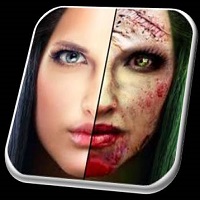
At its heart, the ZombieBooth app is a photo editing tool designed specifically for one thing: transforming faces into zombies. Unlike generic filters on apps like Instagram or Snapchat, ZombieBooth uses 3D animation technology to make your zombie avatar feel alive—literally. Upload a photo, and the app detects your face, overlays zombie features like decaying skin, bulging eyes, and jagged teeth, and then animates it so the zombie can growl, bite, or even react to your touch.
What sets it apart? It’s not just a static edit. The animations make it interactive, turning a simple photo into a short video clip where your zombie self comes to life. Developed by MotionPortrait, Inc., a company known for facial animation tech, ZombieBooth was one of the pioneers in mobile AR-like effects before augmented reality became mainstream. In 2026, with phones boasting better processors, the app runs smoother than ever on devices like the latest Android flagships or iPhones, handling high-res photos without a hitch.
For those new to it, think of it as a prank machine in your pocket. I’ve used it to freak out family members by zombifying group photos—imagine your grandma as a walker from The Walking Dead. It’s simple enough for kids (with supervision, of course, since zombies can be scary) but has enough depth for creative types who want to customize every gory detail.
History and Evolution of ZombieBooth App
ZombieBooth first hit the scene around 2010, riding the wave of zombie pop culture from shows like The Walking Dead and games like Plants vs. Zombies. It quickly gained traction, especially on iOS, where it was available on the App Store. By 2013, the sequel, ZombieBooth 2, was released, boasting improved graphics and more features, which pushed downloads to 20 million for that version alone.
Fast forward to 2026, and while the app isn’t getting major overhauls every month like some modern editors, it’s still actively maintained. The last update, version 4.52, came in April 2025, focusing on compatibility with newer Android versions and bug fixes. On sites like Uptodown, it’s seen over 30,000 downloads just from that platform in recent years, proving its enduring appeal.
Evolution-wise, it started as a basic face swapper but grew to include customizable parts, social sharing, and even pet transformations. Today, in a market flooded with AI apps, ZombieBooth holds its own by keeping things fun and straightforward—no subscriptions or complex menus.
If you’re into app history, check out our [internal link to top augmented reality apps of the decade] for more on how tools like this paved the way for modern filters. For downloads, head to reliable sources like external link to Uptodown ZombieBooth page to grab the APK safely.
Key Features of ZombieBooth App in 2026
Top Zombie Transformation Tools in ZombieBooth App
Diving into the features, the ZombieBooth app shines with its core transformation engine. Automatic face detection scans your photo in seconds, mapping out eyes, mouth, and nose for precise zombie overlays. You get a variety of zombie “skins”—from classic green rot to bloody, post-apocalyptic looks. The 3D animation is the star: your zombie can open its mouth to snarl, blink its dead eyes, or even chew on a virtual finger if you poke the screen.
Customization is key. In the settings, you can tweak elements like skin tone, injury levels, and eye colors. Some parts are free, while others unlock via in-app purchases, which are reasonably priced at around $0.99 for packs. For 2026 users, the app supports high-resolution exports up to 4K, perfect for sharing on social media or printing posters. I’ve found the random injury generator especially fun—it adds unique scars or bites each time, making no two zombies the same.
New Updates and Enhancements for 2026
While not revolutionary, the 2025 update to version 4.52 brought welcome tweaks. It improved compatibility with Android 13 and later, reducing crashes on newer devices. There’s also better integration with phone cameras for live previews, though it’s not full AR like some competitors. No major 2026-specific features yet, but rumors on forums suggest potential AI enhancements in future patches—think smarter face recognition for group shots.
One enhancement worth noting is the expanded sharing options. Now, you can export animated GIFs or MP4s directly to TikTok or Instagram Reels, capitalizing on viral zombie trends. User ratings hover around 4.0-4.5 stars across platforms, with praise for the “stunning special effects” that mimic Hollywood zombies.
Sharing and Social Integration in ZombieBooth App
Sharing is seamless. After creating your zombie, hit the share button to post to Facebook, Twitter (now X), or save to your gallery. This has fueled countless viral moments—think zombie family portraits or celebrity lookalikes gone undead. In 2026, with social media algorithms favoring fun, interactive content, ZombieBooth creations often get boosted visibility.
How to Use ZombieBooth App? Step-by-Step
Downloading and Installing ZombieBooth App on Android/iOS
Getting started is easy. For Android, since it’s not always on Google Play in 2026 (due to age), download the APK from trusted sites like Uptodown. Enable unknown sources in settings, install version 4.52, and you’re set. On iOS, it might be archived, so search the App Store or use alternatives like ZombieBooth 2. The free version has ads, but premium removes them.
Creating Your First Zombie Photo with ZombieBooth App
- Open the app and select “Transform” from the main menu.
- Choose a photo from your gallery or snap a new one.
- Wait for face detection—it’s quick, about 5-10 seconds.
- Customize: Pick zombie type, adjust injuries, and preview animation.
- Save or share your creation.
Pros, Cons, and User Reviews of ZombieBooth App
Advantages of Using ZombieBooth App
The biggest pro is the sheer entertainment value—it’s addictive and hilarious. Ease of use makes it accessible, and the low cost (free with optional buys) beats pricier editors. In 2026, its lightweight design (under 50MB) means it runs on older phones too. Users rave about the realism: “Feels like a movie prop!” says one 5-star review.
Potential Drawbacks and Alternatives
Cons include an dated interface—no dark mode or modern UI flourishes. It can crash on very new OS versions without updates, and iOS availability is spotty. Alternatives? ZombieBooth 2 offers upgrades with 20 million downloads, or try apps like FaceApp for AI zombies.
FAQs About ZombieBooth App
Is the ZombieBooth app still available for download in 2026?
Yes, absolutely. While it may not be on every app store due to its age, you can grab the APK from sites like Uptodown or Aptoide. Version 4.52 is the latest, updated in 2025, and it’s compatible with most Android devices. For iOS, check for ZombieBooth 2 as a solid alternative.
What are the system requirements for ZombieBooth app on Android?
It runs on Android 4.0 and up, but for smooth performance in 2026, aim for Android 10 or later. It needs about 20-50MB of space and camera/gallery access. No heavy hardware demands— even mid-range phones handle it fine.
Can I use ZombieBooth app for group photos?
Sure, but it’s best for single faces. The app detects one primary face, but you can edit multiples by cropping or using ZombieBooth 2, which handles groups better. Great for family zombie portraits!
How does ZombieBooth app compare to other zombie editors?
It’s more animation-focused than sticker-based apps like Zombie Booth Face Changer. Versus modern AI tools, it’s simpler but cheaper and more fun for quick pranks. ZombieBooth 2 edges it with better graphics.
Are there in-app purchases in ZombieBooth app?
Yes, optional packs for extra zombie parts cost $0.99-$1.99. The core app is free, with ads that can be removed via purchase.
Conclusion and Call-to-Action
In 2026, the ZombieBooth app proves classics never die—much like zombies themselves. With its easy transformations, interactive animations, and viral sharing potential, it’s a timeless pick for fun photo editing. Sure, it shows its age in spots, but the joy of seeing your face turn undead outweighs any minor flaws. Whether for Halloween, pranks, or creative outlets, it’s worth a spot on your phone.
Ready to join the undead horde? Download the ZombieBooth app today from Uptodown or your preferred source and start zombifying your world. Share your creations in the comments below—what’s the scariest zombie you’ve made? Don’t forget to check our [internal link to best photo apps 2026] for more recommendations!